Let's connect
All work

01 · Work · Deauth Reaper

deauth reaper.

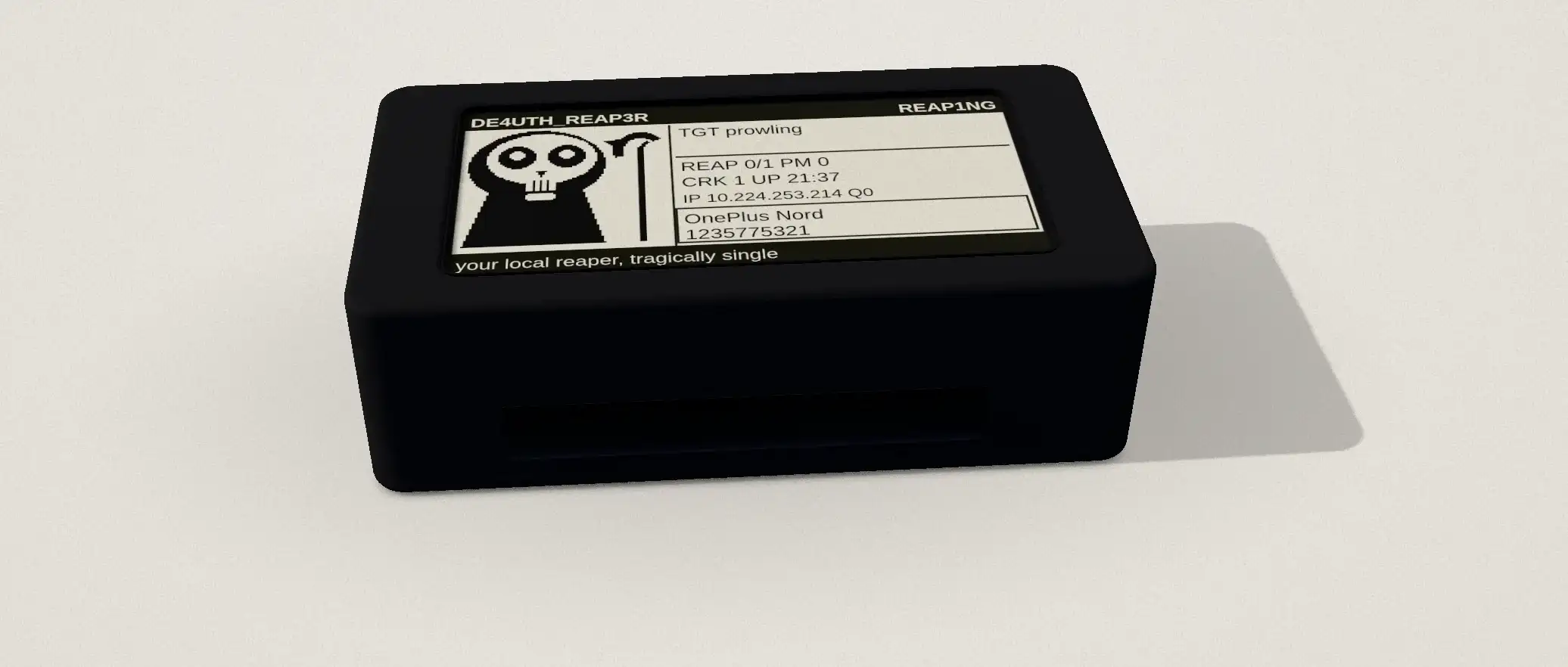
Deauth Reaper is my own take on the pwnagotchi: a palm-size Raspberry Pi that roams for Wi-Fi handshakes and reads its day back on a 2.13-inch e-ink face. I gave it an original character, a screen I drew from scratch, and a cloud cracking loop, then rebuilt the whole thing from a plugin into a standalone service of its own.

The face is a forever-24 goth reaper with 25 moods and a running commentary. Behind it is the real work: a capture engine tuned for a single slow core, and a mobile loop that keeps hunting while it borrows internet from my phone.

Role
Security tooling
Team
Solo
Stack
  • Python
  • Raspberry Pi
  • e-ink
  • bettercap
A 3D model of the Deauth Reaper: a black 3D-printed case with an e-ink screen on top showing the reaper face and its status readout, and HDMI and USB ports along one side. Scrolling lifts it apart into the top shell, the e-paper display board, the Raspberry Pi Zero W with its 40-pin header, and the bottom tray.

scroll to lift it apart

FIG. 02 · The device, modelled from photos. Scroll to lift the stack apart, drag to turn it.
176
automated tests
25
e-ink moods
1
person building it

02 · Story

The story.

  1. Why I built it

    A pwnagotchi with a personality and a point.

    I learn security best by building the tool, not reading about it. I wanted a Wi-Fi gadget that was genuinely fun to carry, honest about what it does, and mine down to the character on the screen.

  2. The hard part

    From a plugin to its own machine.

    It started as a pwnagotchi plugin, then ran into the limits of the framework and a 512 MB single-core board. So I rebuilt it as a standalone service that talks to bettercap directly, keeps the e-ink HUD, and serves its own dashboard, with 176 tests holding the capture-and-crack path together. The pwnagotchi dependency is gone.

Who stays in controlAuthorized use only. I run it against my own networks and lab devices I have permission to test; my home network is whitelisted so it is never touched.

03 · How it works

How it works.

  • Hunts on its own

    It watches the air, picks a target by signal, and captures the handshake the way a pwnagotchi does. Weak or invalid captures are thrown away on the spot, so the loot it keeps is loot it can use.

  • Cracks in the cloud

    Every capture is checked on the device and invalid ones are dropped. Good ones go to the wpa-sec community service when a tether is up; cracked keys sync back, and the reaper celebrates each one on screen.

  • Tethered to a phone

    It pulls internet from my phone over Bluetooth while it roams, pushes a notification when it lands a crack, and serves its own phone-first web dashboard. No coming home to a cable.

04 · Features

What it does.

  • Leaves protected networks alone

    It reads each network's security settings and skips any that use management-frame protection.

  • One client, not everyone

    A targeted deauth touches a single device instead of knocking a whole network off.

  • Finds a known device

    A hot-and-cold signal meter and a presence watchlist locate and track a device without sending anything.

  • Heals itself

    A watchdog brings the capture interface back if it drops, and the upload queue keeps retrying until it lands.

  • A dashboard on the phone

    Live counters, loot and health on a password-protected web page, updating as it works.

  • Tested off the device

    Every hardware and network dependency is swapped in, so all 176 tests run on a laptop.

05 · Scenarios

Where it's used.

  1. An authorized site audit

    Walking the floor.

    Tethered to a phone, it captures from approved networks, uploads them, and pushes a notification the moment one cracks.

  2. A lab exercise

    One clean handshake.

    A single-client deauth forces one reconnect instead of taking a whole network down.

  3. Teaching Wi-Fi security

    Why protection matters.

    Networks with management-frame protection are skipped on sight, which makes the case for turning it on.

Let's connect.

I am not looking for work. I am looking for good people to know.

Index

  1. 1Home
  2. 2Work
  3. 3Security
  4. 4About